AnFlex (2024)
An integrated ankle-pump exercise assistance and management system.
Project Overview
Project Summary
This project addresses the critical risk of Deep Vein Thrombosis (DVT) in cancer patients undergoing chemotherapy by designing and building an Ankle-pump Exercise Assistance System. The system transforms a difficult rehabilitation routine into a manageable task by combining mechanical assistance with a digital management console.
The system utilizes servo motors to physically assist the ankle exercise when fatigue sets in. An IMU sensor is integrated into the pedal collects motion data, which is processed by an Arduino board. This data is transmitted via Python SDK to an Appwrite Cloud backend. Consequently, the system provides immediate haptic feedback (via a vibration motor) to deliver useful information for patients (exercise quality, exercise starting and ending, etc.).
To ensure efficient data management and user engagement, a dual-interface software solution was developed: a mobile app for patients to control the device and track compliance, and a web dashboard for medical workers to monitor real-time patient status and exercise history.
My Contributions
I was fully responsible for the end-to-end development of the interaction and information management system, bridging the gap between hardware sensing and software application:
Microcontroller & Sensor Integration
Cloud Backend & Data Transfer
Hardware Prototyping & Assembly (Collaborating with Mechanical Designers)
Mobile & Web App Development
Tech Stack
Embedded & IoT Hardware: Arduino, Socket/Serial Protocol
Backend & Cloud: Appwrite Cloud, Python SDK
Frontend: React
Acknowledgements
Thanks to Prof. Ting Han and Prof. Xinyang Tan for guidance, and to Fudan University Shanghai Cancer Center and its medical staff for their support.
Problem Framing
Project Background
The project was initiated based on real-world clinical pain points identified by medical staff at Fudan University Shanghai Cancer Center. Deep vein thrombosis (DVT) is a major concern in hospital settings, as it can progress to fatal pulmonary embolism (PE), which carries a mortality rate of 20–30%. While ankle pump exercises have been proven to be the simplest, most cost-effective, and non-invasive method for preventing DVT by promoting lower-limb blood circulation, many patients—particularly those who are bedridden or recovering from surgery—face difficulties in performing these exercises correctly and consistently.
In response to this gap between proven prevention and actual patient compliance, the medical staff at the Cancer Center called for the design and development of a device that can assist and monitor ankle pump movements, specifically targeting high-risk populations such as patients undergoing cancer treatment.
Field Research & Interview
To gain a deep understanding of the problem context, we conducted on-site research at the hospital. Through close observations of the treatment scenarios of cancer chemotherapy patients (especially the physical constraints and ward environment), and interviews with several healthcare professionals, we understood the functional requirements and system design limitations in this clinical setting.
Environment
Patients
Caregivers
Nurses
Pain Points:
Limited space in shared wards (e.g., triple/quadruple rooms)
Privacy concerns (given the sensitive location of femoral artery access)
Demands:
Compact, easy-to-wear device design
No camera-based solutions (compromise privacy)
No voice interactions (disturbing for shared wards)


System Architecture
Mechanical Design
The device uses a compact pedal module mounted on the bed’s footboard via a sliding rail, allowing height adjustment for different patients. A soft orthosis secures the limb while leaving the ankle free for movement. Two servo motors are used to provide motion assistance. Each servo is connected to the pedal via an elastic cord, ensuring that the pulling force changes linearly during movement. This linear force variation prevents sudden tension shifts, making the exercise smooth and comfortable for the patient.


Data Flow
The system follows a three-tier IoT architecture:
Perception Layer — The hardware prototype integrates an IMU sensor embedded in the pedal to capture real‑time motion data. An Arduino microcontroller handles local data processing, control logic, servo motor control for mechanical assistance, and a vibration motor for haptic feedback. It runs closed‑loop algorithms to assess exercise compliance and movement quality.
Network Layer — The microcontroller transmits sensor data to Appwrite Cloud via Python SDK. This layer manages data validation, protocol conversion, and reliable bidirectional communication.
Application Layer — The cloud database (Appwrite) synchronizes data with two client applications: (1) a Mobile App for patients (and caregivers) to control the device, view exercise progress, and receive notifications; and (2) a Web Dashboard for medical professionals to monitor multiple patients’ compliance, analyze training history, and generate reports.

User Flow
The patient starts the session via the app. The device then signals the start with a vibration, prompting the patient to begin the ankle-pump exercise. As the device drives the pedal, an IMU sensor validates the movement. If the motion is correct, the server increments the rep count, and the device provides vibration feedback to the patient. This cycle repeats until the target repetitions are reached. Once completed, the device stops and signals the end of the session, the server generates a report, and both the patient and nurse can view the final records.
For patients, the automated vibration feedback and app-based control eliminate the need for constant manual tracking, making rehabilitation exercises more engaging and easier to perform independently.
For nurses, the real-time dashboard and automated report generation enable efficient remote monitoring of multiple patients’ progress without requiring physical presence during each exercise session.

Hardware Prototyping & Data Transfer
Pedal & Servo Integration
During the construction of the physical prototype, we installed a pair of foot pedals with caster wheels onto a base made of steel bars and slide rails, and connected two 35kg servo motors to the left and right pedals respectively.


Sensor & Data Transfer
At the same time, we tested the IMU sensor on a cardboard model, defined appropriate angle thresholds based on the actual scenario of ankle pump exercises. Then, we developed a step counter according to the thresholds, and uploaded the motion data in real time to the backend of Appwrite Cloud via the Socket io and Python SDK.


Assembly
We installed the sensing system into a leg brace (with the fixation at the ankle joint removed to allow movement) and attached it to one side of the pedal, in order to synchronize the servo-assisted motion with the counting of the IMU sensor.


Software Development
Backend (Server): Appwrite Database Implementation
For the prototype, we implemented a simplified database architecture using Appwrite Cloud and focused on core functionality: exercise reps tracking and cloud synchronization.
The system utilizes 2 tables to store training session records and patient information. Both tables are indexed by patient ID, enabling retrieval of individual records.
Patients Info Collection: Stores minimal patient information including a unique patient ID, name, ward number, chemotherapy starting & ending time, and a cumulative exercise session counter that automatically increments with each completed session.
Training Sessions Collection: Records individual exercise sessions with details such as session ID, repetition count, duration, and timestamps.
Frontend (Client): Data Visualization
Based on the data retrieved from Appwrite Cloud, the information is clearly visualized via a mobile app (designed for patients and their caregivers) and a web app (designed for medical workers).
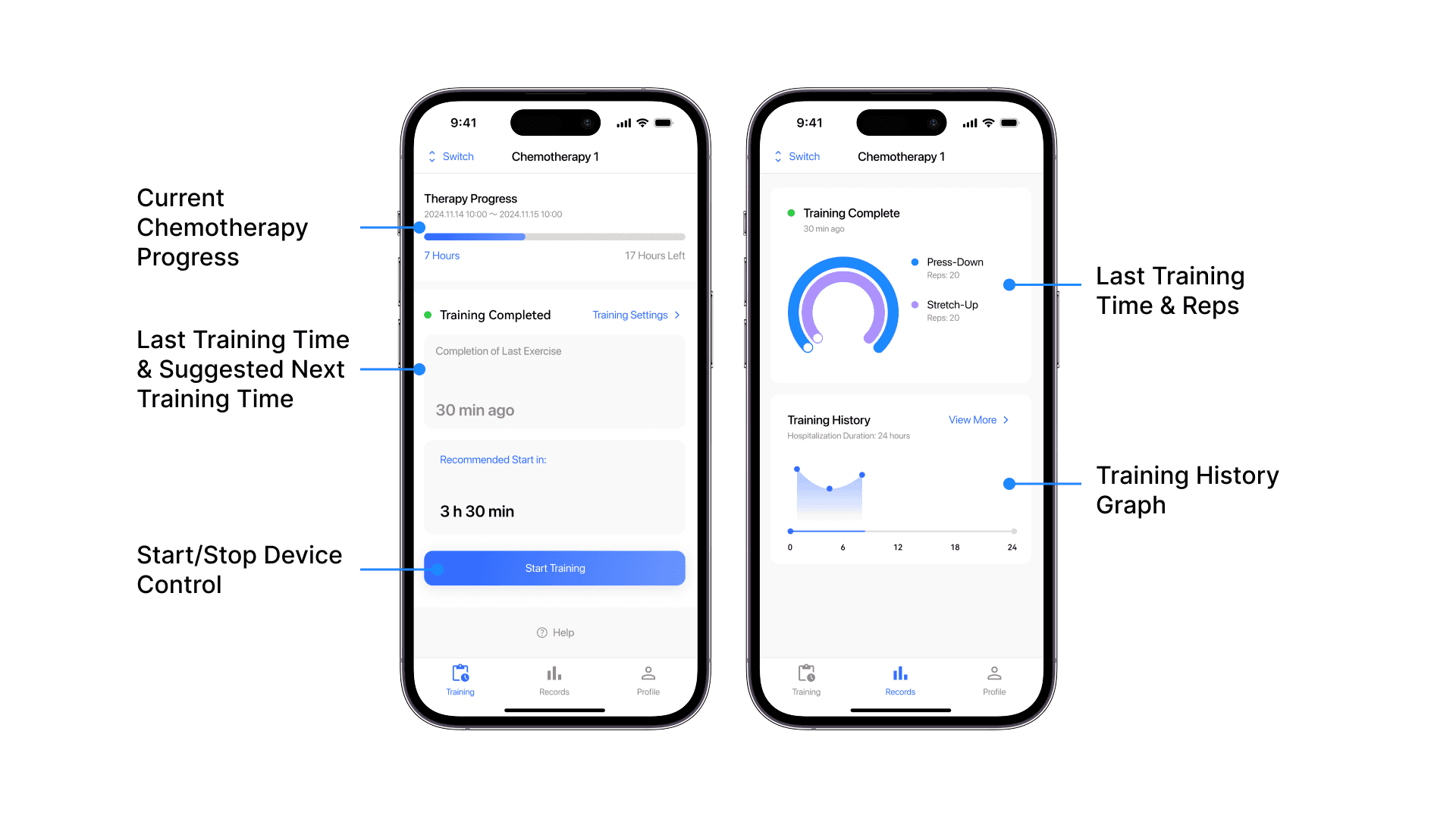
The mobile application controls the device and provides intuitive visual feedback to help patients and caregivers monitor their exercise status, suggest training schedule within the prescribed chemotherapy schedule.
The web app provides medical staff with a centralized command center for monitoring patient compliance and managing chemotherapy progress. The main Dashboard is designed to highlight patients pending training (requiring intervention) sorted by their last training time. The Training Reports module offers a detailed tabular view for patient data through a structured list containing Name, Room Number, Hospitalization Time, and Latest Completion Time.


Project Delivery & Critical Reflection
Project Delivery and Demonstration
The prototype was presented to medical staff at Fudan University Shanghai Cancer Center for validation. The system successfully demonstrated the feasibility of automated ankle-pump assistance and remote monitoring.


Critical Feedback - Security & Compliance
During the review, medical professionals highlighted a critical gap: Data Security and Regulatory Compliance. While the functional prototype worked, transmitting patient health data via cloud services (Appwrite) raised concerns regarding patient privacy and data encryption standards.
Future Improvement - Architecting for Trust
Acknowledging the critical feedback regarding data sovereignty and privacy, I conducted follow-up research on healthcare information security regulations in China. This led to the design of alternative technical architectures—prioritizing local data storage, access control (enhanced by audit log), and encryption—to ensure the system meets regulatory standards without compromising usability.
" height="142.88125020630508px" id="Hq26LX6SZ" transform="translate(12.5 25)" width="175.84999999999997px"/><path d="M 49.175 10.987 L 65.65 10.987 C 68.583 10.848 70.888 8.429 70.888 5.494 C 70.888 2.558 68.583 0.14 65.65 0 L 49.175 0 C 46.243 0.14 43.937 2.558 43.937 5.494 C 43.937 8.429 46.243 10.848 49.175 10.987 Z M 27.207 10.987 L 29.95 10.987 C 32.883 10.848 35.188 8.429 35.188 5.494 C 35.188 2.558 32.883 0.14 29.95 0 L 27.207 0 C 24.274 0.14 21.969 2.558 21.969 5.494 C 21.969 8.429 24.274 10.848 27.207 10.987 Z M 5.238 10.987 L 7.982 10.987 C 10.914 10.848 13.219 8.429 13.219 5.494 C 13.219 2.558 10.914 0.14 7.982 0 L 5.238 0 C 2.306 0.14 0 2.558 0 5.494 C 0 8.429 2.306 10.848 5.238 10.987 Z" fill="rgb(0, 0, 0)" height="10.987499999999955px" id="a6Z9akDrL" transform="translate(97.937 140.381)" width="70.88824076091487px"/></svg>)
Local Storage
" height="175px" id="pGFoTe1_b" transform="translate(26.76 12.28)" width="147.02060931899643px"/></svg>)
Encryption
" width="179.9688431150143px"><path d="M 53.119 25 L 34.369 25 L 34.369 12.5 L 53.119 12.5 C 56.571 12.5 59.369 9.702 59.369 6.25 C 59.369 2.798 56.571 0 53.119 0 L 28.119 0 C 24.667 0 21.869 2.798 21.869 6.25 L 21.869 50.75 C 7.916 53.924 -1.423 67.075 0.178 81.295 C 1.78 95.514 13.81 106.259 28.119 106.25 C 43.652 106.25 56.244 93.658 56.244 78.125 C 56.229 65.015 47.153 53.657 34.369 50.75 L 34.369 37.5 L 53.119 37.5 C 56.571 37.5 59.369 34.702 59.369 31.25 C 59.369 27.798 56.571 25 53.119 25 Z M 43.744 78.125 C 43.744 86.754 36.748 93.75 28.119 93.75 C 19.489 93.75 12.494 86.754 12.494 78.125 C 12.494 69.496 19.489 62.5 28.119 62.5 C 36.748 62.5 43.744 69.496 43.744 78.125 Z" fill="rgb(0, 0, 0)" height="106.25000525511416px" id="C1pMqrdQK" transform="translate(120.6 68.75)" width="59.368875158471326px"/><path d="M 104.113 160.694 L 103.944 160.75 C 65.125 163.575 21.975 160.269 12.813 155.494 C 15.012 149.594 29 140.887 56.344 137.887 C 59.513 137.54 61.912 134.863 61.913 131.675 L 61.913 124.244 C 61.913 122.125 60.838 120.15 59.056 118.994 C 49.056 112.531 40.281 101.894 34.981 89.819 C 34.39 88.48 33.352 87.388 32.044 86.731 C 30.35 85.887 27.8 82.844 25.275 73.119 C 24.306 69.394 24.969 66.719 27.35 64.712 C 28.681 63.588 29.483 61.959 29.563 60.219 C 30.9 30.337 47.587 12.5 74.188 12.5 C 100.256 12.5 116.2 29.4 117.925 58.862 C 118.043 60.841 119.091 62.647 120.75 63.731 C 123.287 65.387 124.05 67.756 123.169 71.181 C 120.719 80.612 118.281 82.6 117.338 83.013 C 115.792 83.696 114.591 84.977 114.006 86.563 C 109.125 99.806 99.875 111.9 89.269 118.919 C 87.52 120.076 86.468 122.034 86.469 124.131 L 86.469 131.669 C 86.469 134.857 88.868 137.534 92.038 137.881 C 94.244 138.119 97.694 138.656 102.4 139.475 C 105.794 140.044 109.038 137.781 109.625 134.387 C 110.212 130.994 107.931 127.75 104.538 127.162 C 103.1 126.911 101.66 126.67 100.219 126.438 C 110.781 118.231 119.581 106.356 124.919 93.031 C 130.8 88.938 133.531 81.025 135.269 74.325 C 137.2 66.888 135.306 59.987 130.194 55.288 C 127.15 21.1 105.9 0 74.188 0 C 41.375 0 19.725 21.831 17.212 57.163 C 12.756 62.163 11.281 68.969 13.175 76.25 C 15.906 86.769 19.406 93.2 24.363 96.662 C 29.875 108.425 38.238 118.956 47.894 126.388 C 18.563 130.944 0 142.662 0 157.069 C 0 158.844 0.55 161.475 3.163 163.906 C 11.6 171.731 44.469 174.231 73.538 174.231 C 85.531 174.231 96.881 173.806 105.594 173.15 C 106.082 173.113 106.565 173.018 107.031 172.869 L 107.913 172.588 C 111.198 171.534 113.008 168.017 111.956 164.731 C 111.459 163.151 110.35 161.835 108.877 161.076 C 107.403 160.318 105.688 160.18 104.113 160.694 Z" fill="rgb(0, 0, 0)" height="174.23125000000002px" id="zYyAyHw5R" width="136.0101279394139px"/></g></svg>)
Access Control
" height="79.375px" id="ATynQPdI9" transform="translate(26.875 60.208)" width="145.83333339843753px"/></svg>)
Self-hosting: deploy Appwrite with Docker on the hospital’s local server.
Data transfer: enable HTTPS across all data transfers.
Encrypt sensitive fields using the Chinese commercial cryptography standard SM4.
Enhanced tracking: add Python middleware to capture and retain audit logs.
Access management: integrate with the hospital information system for identity authentication.
" height="173.3573819462307px" id="uYSDJXpWY" transform="translate(13 13.5)" width="174px"/></svg>)